
Master Inbox vs Front: Which one should you choose?
On this page
- Key differences (the 5 things that matter most)
- Category fit: what these tools are (and what to evaluate)
- Quick verdict (best for, strengths, tradeoffs)
- Side-by-side comparison (category-specific criteria)
- Deep dive: Master Inbox (where it wins / where it doesn’t)
- Deep dive: Front (where it wins / where it doesn’t)
- Pricing comparison (how to think about cost)
- Integrations & workflows (how each fits your stack)
- Implementation & switching (from Front → Master Inbox)
- Common objections (and what’s true)
- Why sales teams choose Master Inbox?
- Why support teams choose Front?
- 60-second decision checklist
- FAQs
- Final recommendation
Choosing the right communication tool is critical for any B2B team. In the Master Inbox vs Front debate, you're looking at two powerful but fundamentally different platforms that can shape your sales strategy.
While both promise a more organized inbox, they solve distinct problems for different users. This comparison is for B2B SaaS founders, SDR/BDR teams, and RevOps leaders who need to decide whether to adopt a specialized sales tool or a broad communication platform.
Master Inbox is a purpose-built command center for managing replies from multi-channel outbound sales campaigns. It ensures no lead is ever missed. Front, on the other hand, is a comprehensive customer communication hub designed for teams to manage shared inboxes for email, SMS, social media, and more. This article will break down the features, use cases, and pricing of both tools in the Master Inbox vs Front comparison to help you make the right choice for your team's specific needs and goals.
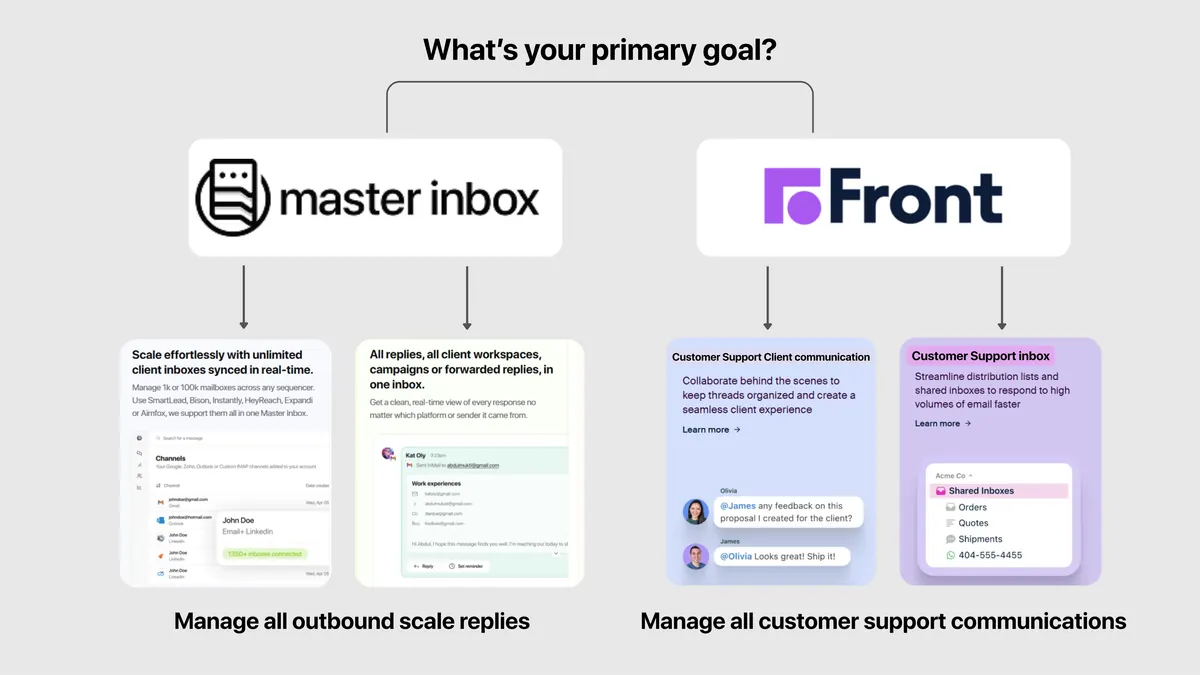
Key differences (the 5 things that matter most)
- Core Use Case: Master Inbox is laser-focused on outbound sales reply management. Front is a generalist customer communication hub for multiple departments.
- Primary Channels: Master Inbox is optimized for email and LinkedIn replies coming from sequencers. Front supports a wider array of channels, including email, SMS, live chat, and social media.
- Integration Philosophy: Master Inbox is the unified master inbox that connects to your sales sequencers. Front integrates with CRMs and helpdesks to act as a central system of record for communication.
- Target User: Master Inbox is designed specifically for high-volume SDRs and BDRs. Front is built for a broader audience, including customer support agents, account managers, and operations teams.
- Complexity: Master Inbox is a simple, focused tool with a fast time-to-value. Front is a more complex platform that requires significant configuration and team onboarding.
Category fit: what these tools are (and what to evaluate)
Both tools fall into the category of Inbox and Communication Management. To make a clear decision, we'll evaluate them based on these key criteria:
- Core Use Case: What specific problem does the tool solve best?
- Channel Support: Which communication channels does it handle effectively?
- Integration Ecosystem: How well does it fit into an existing tech stack?
- Target User: Who is the ideal user profile for the platform?
- Collaboration Features: How does it enable teams to work together?
- Automation Capabilities: What repetitive tasks can it automate?
- Pricing Model: How is the tool priced and what drives the cost?
- Time-to-Value: How quickly can a team get up and running and see results?
Quick verdict (best for, strengths, tradeoffs)
| Category | Master Inbox | Front |
|---|---|---|
| Best for | Scaling outbound sales teams managing high-volume replies. | Collaborative teams needing a unified hub for all customer communication. |
| Biggest strength | Centralizing replies from multiple outbound sequencers. | Broad multi-channel support and deep CRM integrations. |
| Biggest tradeoff | Narrow focus on outbound replies; not a full communication suite. | Complexity and cost can be overkill for just sales outreach. |
| Time-to-value | Fast; connects to existing tools in minutes. | Medium; requires team onboarding and workflow configuration. |
| Pricing approach | Per-user, with tiers based on connected inboxes. | Per-user, with tiers based on features and channels. |
Master Inbox is the specialist's choice. It's a sharp, precise tool designed to solve one of the most expensive problems in sales: missed replies from outbound campaigns. Front is the powerful generalist, an all-in-one platform that can serve an entire organization's communication needs. Your choice depends entirely on whether you're solving a specific, high-stakes sales problem or a broader, company-wide communication challenge.
Side-by-side comparison (category-specific criteria)
| Criteria (what matters) | Master Inbox | Front | Notes / proof |
|---|---|---|---|
| Core Use Case | Outbound Sales Reply Management | General Customer Communication Hub | Master Inbox is a specialized tool for SDRs, while Front is a platform for support, ops, and sales teams. |
| Primary Channels | Email & LinkedIn (from sequencers) | Email, SMS, Live Chat, Social Media | Master Inbox focuses on the two key channels for B2B outbound. Front aims for comprehensive channel coverage. |
| Key Integrations | Sales Sequencers (Lemlist, Smartlead, Expandi) | CRMs (Salesforce, HubSpot), Help Desks, Project Management | Master Inbox complements your outbound stack. Front aims to be the central hub of your customer comms stack. |
| Ideal User | SDRs, BDRs, Agency Owners | Support Agents, Account Managers, Ops Teams | The tools are built for fundamentally different user workflows and daily tasks. |
| Automation | Focused on reply handling and inbox organization. | Complex, cross-channel rules for routing, SLAs, and escalations. | Front's automation is far more extensive but also more complex to set up and manage. |
| Setup Complexity | Low (connect accounts and go) | Medium-to-High (configure inboxes, rules, teams) | You can be live with Master Inbox in minutes. Front requires a more involved implementation project. |
Deep dive: Master Inbox (where it wins / where it doesn’t)
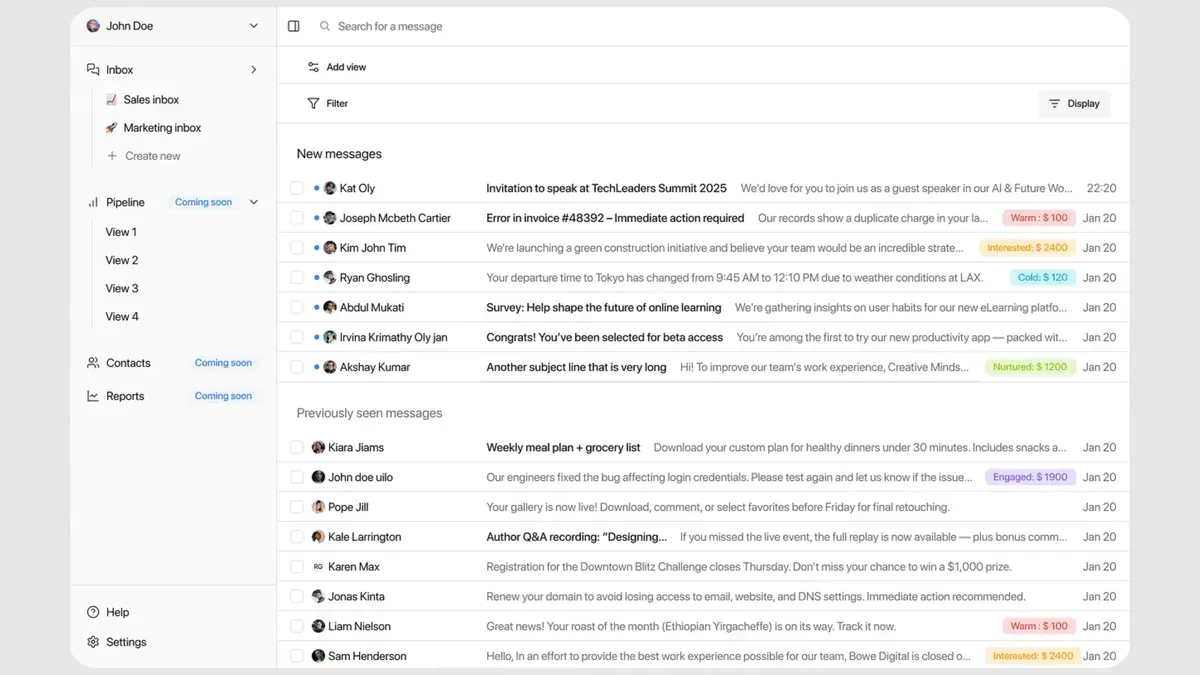
Master Inbox is built on the premise that a missed reply is a lost deal. It’s designed to be the single source of truth for all your outbound sales conversations.
Strengths
- Unified Inbox: It provides a combined inbox for every reply, preventing leads from slipping through the cracks.
- Multi-Channel Mastery: It seamlessly combines LinkedIn and Email replies, the two most critical channels for B2B outreach.
- Preserves Context: Unlike sequencer inboxes, Master Inbox maintains full thread context, so you always know the conversation history.
- Sequencer Integrations: It connects directly with the tools you already use, including Lemlist, HeyReach, and Expandi.
- Speed and Simplicity: The user interface is clean, fast, and designed for one purpose: managing replies efficiently.
- Team Collaboration: Prevents embarrassing double-replies by showing when a teammate is viewing or responding to a message.
- Fast Time-to-Value: Setup takes minutes, not weeks. Connect your accounts and start managing replies immediately.
Weaknesses / limitations
- Not a general-purpose communication tool for support or operations.
- Does not support channels like SMS, live chat, or social media mentions.
- Fewer native CRM integrations compared to broad platforms like Front.
- Analytics are focused on reply management, not overall customer lifecycle metrics.
- It is not a standalone sequencer; it requires an existing tool like Smartlead or Instantly.
Ideal use cases
- Sales teams running high-volume outbound campaigns across email and LinkedIn.
- BDRs who struggle to keep track of conversations across multiple platforms.
- Lead generation agencies managing campaigns for several clients.
- Teams looking to improve their cold email reply rate by ensuring faster, more organized responses.
Deep dive: Front (where it wins / where it doesn’t)
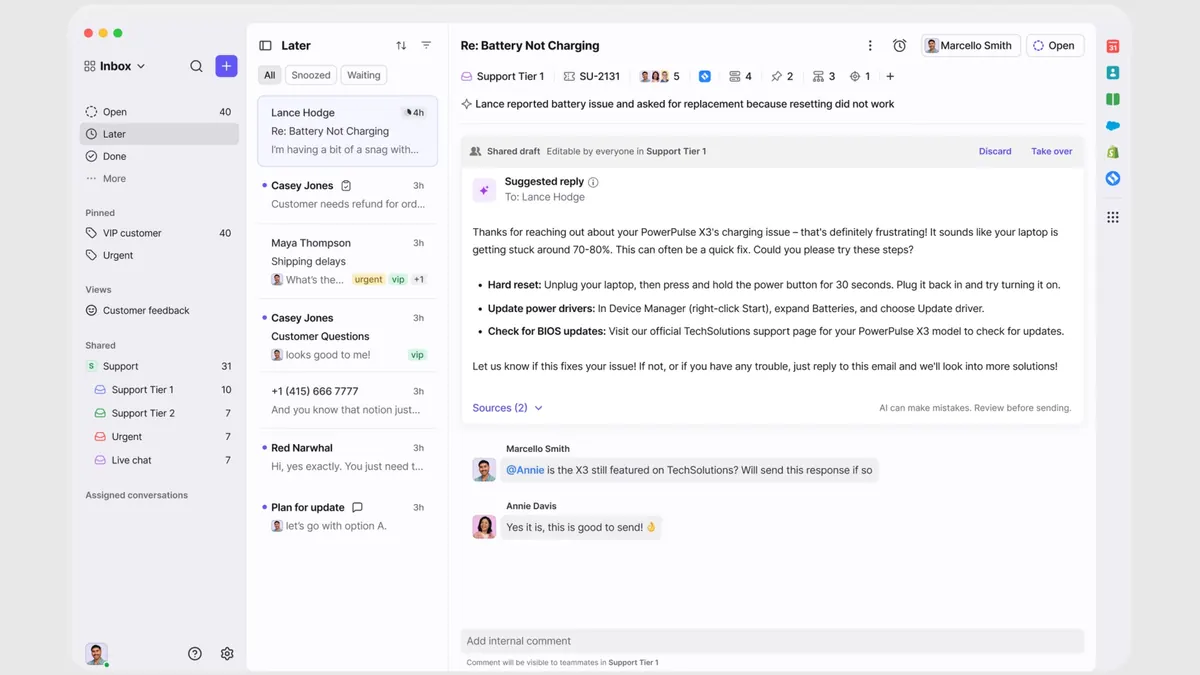
Front is a powerful platform designed to bring all of a company's external communication into one collaborative space.
Strengths
- Omni-Channel Support: Manages a wide array of channels including email, SMS, WhatsApp, live chat, and social media.
- Powerful Automation: Allows for complex rules to automate routing, assignments, SLAs, and responses.
- Deep Integrations: Offers a vast library of integrations with major CRMs (Salesforce), project management tools (Jira, Asana), and more.
- Advanced Collaboration: Features like internal comments, shared drafts, and clear ownership prevent internal confusion.
- Comprehensive Analytics: Provides detailed reporting on team performance, response times, and conversation volume.
- Serves Multiple Departments: Can be used by support, sales, success, and operations teams simultaneously.
Weaknesses / limitations
- Overkill for teams that only need to manage outbound sales replies.
- Not specifically designed to integrate with and solve the unique problems of sales sequencers.
- Can be expensive, with costs scaling quickly based on user count and feature tiers.
- Requires a significant investment in setup, configuration, and team training.
- Its generalist nature means it lacks the specialized focus on preserving outbound thread context that Master Inbox has.
Ideal use cases
- Customer support teams managing a high volume of inbound requests from
support@. - Operations teams that need to collaborate on emails with vendors and partners.
- Account management teams requiring a shared view of all client communication history.
- Sales teams that primarily handle inbound leads coming through a central
sales@email address.
Pricing comparison (how to think about cost)
Neither Master Inbox nor Front hides their pricing, but their models reflect their different philosophies. You should not just compare numbers, but what you get for that cost.
Master Inbox's pricing is structured on dedicated mailbox tiers, with unlimited users on every plan. The cost is driven by the size of your sales team and the number of inboxes you need to connect. The value is straightforward: it's an investment to prevent the loss of high-value deals. The core question to ask is, what is the cost of a single missed reply from a qualified prospect?
Front also uses a per-user, tiered pricing model (e.g., Starter, Growth, Scale). However, the cost is driven by the breadth of features you need, such as the number of channels, advanced automation rules, analytics, and premium integrations. It's a platform investment, and the cost can become substantial as you add more users and unlock more powerful capabilities.
Integrations & workflows (how each fits your stack)
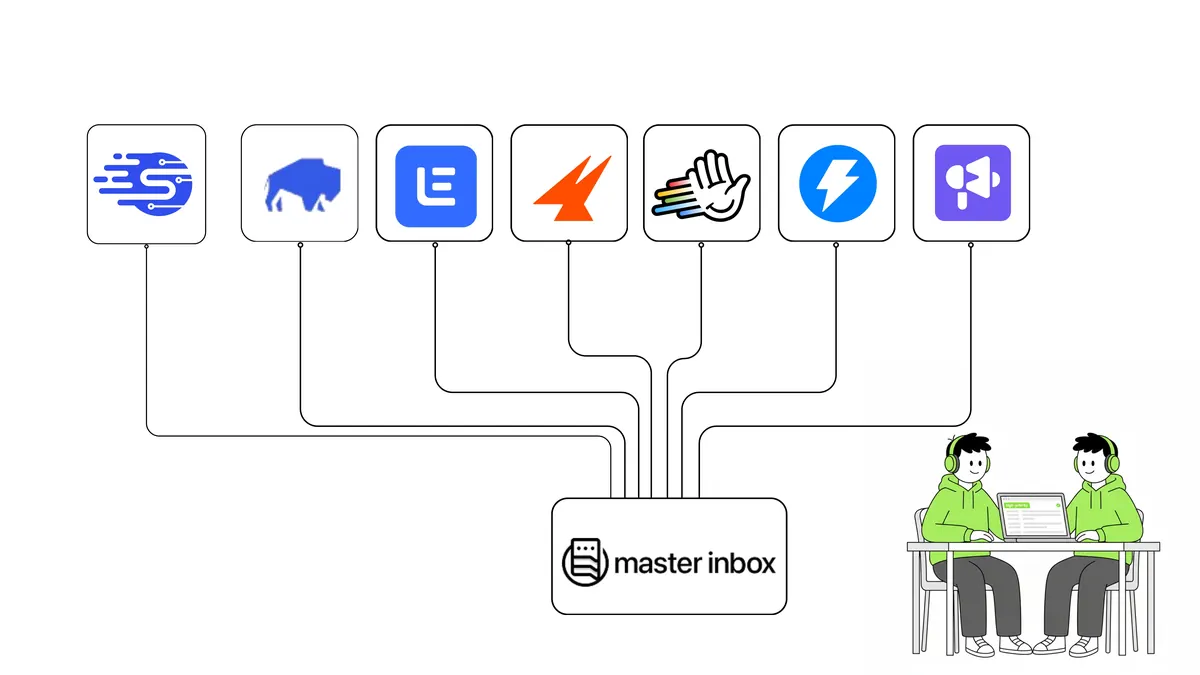
Master Inbox is designed to be a lean, powerful layer within your existing outbound sales stack. Its primary workflow is to pull replies from all your sequencers into one place. It integrates natively with the most popular outbound tools, including EmailBison, Smartlead, Instantly, and more. It doesn't replace these tools; it makes them more effective by solving the final-mile problem of reply management.
Front is designed to be the central hub of your communication stack. Its workflow involves replacing individual or shared inboxes (like Gmail) for team-based communication. It integrates deeply with systems of record like Salesforce and HubSpot, and internal tools like Slack and Jira. The goal is to make communication a part of a larger business process, connecting a support ticket in Front to an engineering ticket in Jira, for example.
Implementation & switching (from Front → Master Inbox)
If your sales team is currently using Front to manage outbound replies and finding it clunky, switching to Master Inbox is straightforward. Front is a powerful tool, but it's often the wrong one for this specific job.
Here’s a 7-day switching checklist:
- Day 1: Sign up for Master Inbox and connect your primary email and LinkedIn accounts.
- Day 1: Connect your sales sequencing tools (e.g., Smartlead, Lemlist).
- Day 2: Invite your SDR/BDR team and assign them to their respective inboxes.
- Day 2: Hold a 30-minute training session: all outbound replies must now be handled exclusively in Master Inbox.
- Days 3-6: Monitor workflows. Ensure reps are using Master Inbox to reply and that no conversations are happening in Gmail or the sequencer's native inbox.
- Day 7: Review the results. Measure time-to-reply and gather qualitative feedback from the team on speed and organization.
- Post-Switch: Decommission the SDR team's seats in Front, potentially reallocating those licenses to support or ops teams where the tool is a better fit.
Common objections (and what’s true)
"Can't I just use a shared inbox in Gmail?"
Shared inboxes in Gmail or Outlook lack the critical context from your sequencing tools. They don't integrate with LinkedIn and make it nearly impossible to track which reply belongs to which campaign, often leading to lost leads.
"Is Master Inbox just another inbox to check?"
No, it's the opposite. It's a command center for all your replies, designed to replace the need to check Gmail, Outlook, LinkedIn, and multiple sequencer UIs. It reduces the number of tabs you need, not increases them.
"Front does everything, isn't that better?"
For managing outbound sales replies, a specialized tool is superior. Front is a 'jack of all trades' in this context; it isn't built to handle the specific nuances of sequencer thread context and multi-channel campaign replies. Using it for this purpose is like using a Swiss Army knife for a job that requires a scalpel.
"Is it secure?"
Yes. Master Inbox uses industry-standard OAuth for connecting accounts, ensuring your credentials are secure. The platform is built with security in mind for teams handling sensitive prospect data.
"What's the real ROI?"
The ROI is simple: closing one extra deal that would have been lost in a messy inbox. Given the value of a new customer, Master Inbox often pays for itself by preventing just one high-value lead from slipping through the cracks.
Why sales teams choose Master Inbox?
- Sales teams using two or more outbound channels, especially email and LinkedIn.
- Users of sales sequencers like Smartlead, Instantly, Lemlist, or Expandi.
- Lead generation agencies managing campaigns for multiple clients.
- Sales leaders who know that speed-to-lead is critical for conversion.
- Teams that are currently losing track of replies in cluttered Gmail or Outlook inboxes.
- Anyone who finds the native inboxes of their sequencing tools to be slow and unreliable.
- Founders who want to ensure their investment in outbound prospecting isn't wasted by missed opportunities.
- Teams that value a simple, focused tool that excels at one critical job.
Why support teams choose Front?
- Customer support teams that need to manage a
support@orhelp@inbox. - Operations or logistics teams collaborating on communication with partners and vendors.
- Account management teams needing a shared view of client conversations.
- Companies that need to manage customer communication across email, SMS, and social media.
- Organizations requiring complex automation for routing, SLAs, and reporting.
- Teams that need deep, bi-directional integration with a CRM like Salesforce for all communications.
- Companies looking for a single, company-wide platform to replace siloed inboxes.
60-second decision checklist
Answer these questions to find your winner:
- Is your main goal to manage replies from outbound sales sequencers? (Yes → Master Inbox)
- Do you need to manage customer support tickets via SMS and social media? (Yes → Front)
- Do you use tools like Lemlist, Smartlead, or how we book 54+ meetings a week on LinkedIn? (Yes → Master Inbox)
- Is your primary use case a shared
support@inbox? (Yes → Front) - Is your biggest pain point losing track of LinkedIn message replies? (Yes → Master Inbox)
- Do you need to build complex automation rules for support ticket routing? (Yes → Front)
- Is guided, done-with-you setup a top priority? (Yes → Master Inbox)
- Are you looking for a platform to serve your entire 100-person company? (Yes → Front)
FAQs
What is the main difference between Master Inbox and Front?
Master Inbox is a specialized tool for managing replies from outbound sales campaigns (email and LinkedIn). Front is a general customer communication platform for managing multiple channels (email, SMS, chat) across different teams like support and ops.
Does Master Inbox replace my sales sequencer like Lemlist?
No, Master Inbox works with your sequencer. It's a dedicated inbox that centralizes all the replies your sequencer generates, ensuring you never miss one.
Can I use Master Inbox for customer support?
It's not designed for that purpose. Its features are optimized for sales reply management. Front is a much better choice for a customer support use case.
How does Master Inbox pricing work?
Master Inbox is priced on dedicated mailbox tiers, with unlimited users on every plan, as low as $22 per client at scale. The final cost depends on your team size and needs. You can review the details on their official pricing page.
How long does it take to set up Master Inbox?
Setup is incredibly fast, typically taking less than 15 minutes. You just need to connect your email/LinkedIn accounts and your sequencing tools.
Does Front integrate with sales sequencers?
Not in the way Master Inbox does. Front is not built to pull in reply data and maintain thread context from tools like Smartlead or Instantly. It's a different integration philosophy.
Final recommendation
The choice between Master Inbox and Front comes down to specialization versus generalization. Front is a capable, broad platform for company-wide communication. However, for the critical, high-stakes task of managing outbound sales replies, it's the wrong tool for the job. The risk of a warm lead getting lost in a complex, general-purpose inbox is simply too high.
For B2B SaaS founders, SDR teams, and RevOps leaders focused on maximizing the ROI of their outbound efforts, Master Inbox is the clear winner. It is purpose-built to solve the single, expensive problem of missed replies. It ensures every conversation started by your sales team gets the attention it deserves, directly protecting your pipeline and revenue. If you're serious about outbound sales, you need a tool serious about replies.