
Every morningTime to lead
Who is sitting on a hot lead
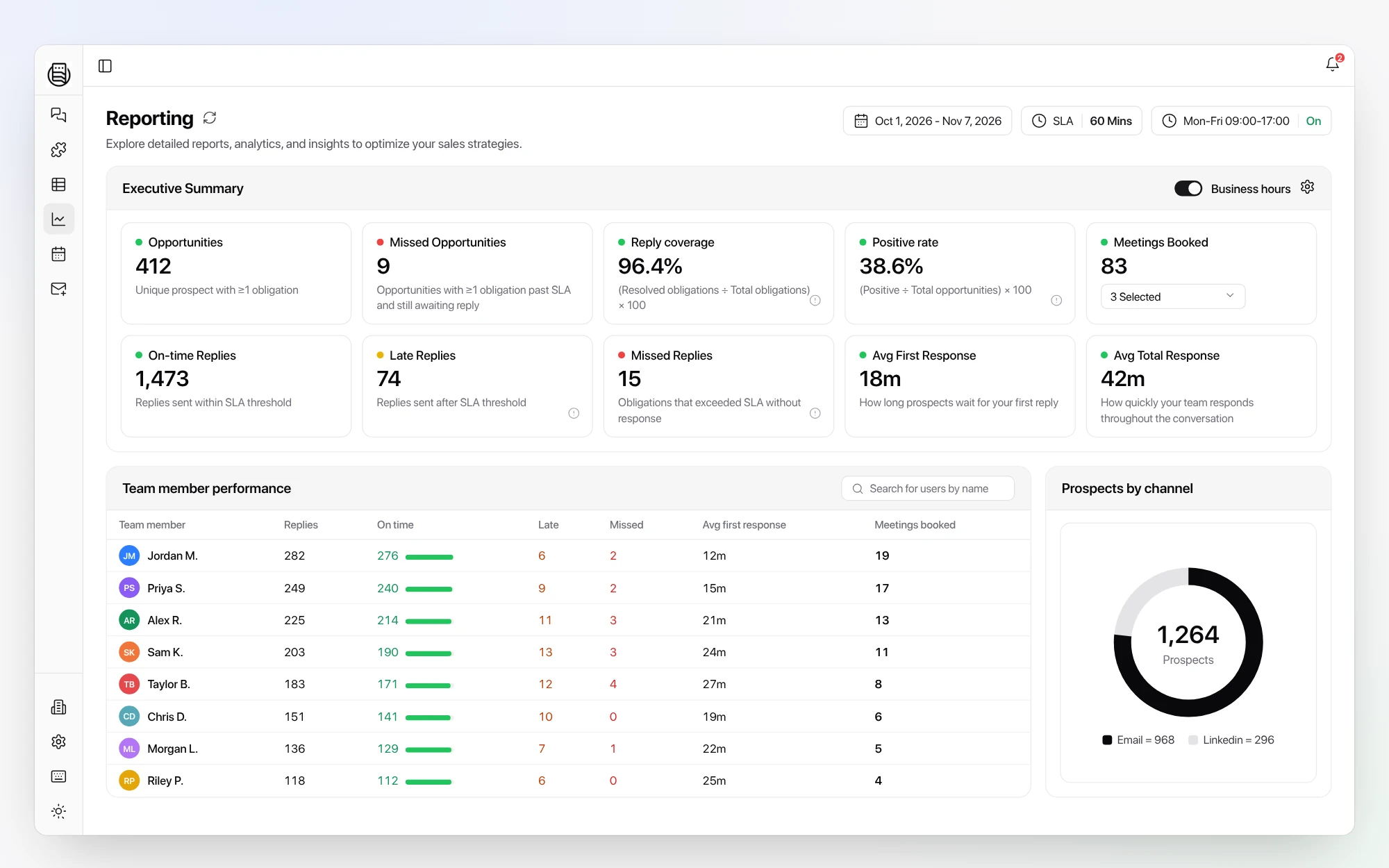
Each rep’s time to lead against your SLA, and every interested reply still waiting for an answer, before it goes cold.
Your reps juggle three or four tools to answer one lead, and you find out a deal went cold weeks later. Master Inbox puts every reply in one place, shows each rep’s time to lead, and keeps the whole chain tracked in your CRM.
Meetings booked, time to lead and missed replies, by rep, on one screen.
Jordan K.
18m
On timePriya N.
47m
On timeSam R.
2h 12m
LateYour SLA: 60 minutes
Three or four tools open to answer one lead
The email chain lost when a rep replies from the CRM
Conversations copied into HubSpot by hand
A follow-up sheet nobody keeps up to date
Every reply from every sequencer and LinkedIn in one place
The whole chain kept and tracked in your CRM
The first rep to reply owns the lead
Reminders that replace the follow-up tracker
Your sequencers keep sending. Master Inbox takes over everything that comes back.
No exports and no spreadsheet nights. The numbers come from the replies themselves.
Each rep’s time to lead against your SLA, and every interested reply still waiting for an answer, before it goes cold.
Booked straight from each rep’s own calendar, attributed to the campaign and the rep who worked the reply.
Open any rep’s inbox and read what went out. Coaching starts from real conversations, not a dashboard guess.
“If you want results from reps you have to make it easier for them. Having a partner that builds the integration we need and puts everything in one place is exactly that.”
No. Smartlead, Instantly, EmailBison, HeyReach and the rest keep sending. Master Inbox handles every reply that comes back, including the forwards and CC replies they miss.
Reporting shows each rep’s time to lead against your SLA, replies answered and missed, and meetings booked, by rep and by channel.
See reportingYes. Replies, the whole chain and labels sync two ways with HubSpot, and native Salesforce sync is live in beta. Pipedrive, Attio, Close and GoHighLevel are supported too.
See integrationsNo. Every plan includes unlimited users and unlimited mailboxes under fair use, so adding reps costs nothing.
See pricingWe set it up with you on your own inboxes, so the first report is your team’s real numbers.
20 minutes, live with your own mailboxes. No setup before the call.