
Your next deal is sitting in an inbox nobody is watching.
Speed to lead decides who wins. Master Inbox threads every mailbox and LinkedIn reply into one view, shows who is slow to respond, and catches the replies your sequencer never even shows you.
Jordan K.
18m
On timePriya N.
47m
On timeSam R.
2h 12m
LateYour SLA: 60 minutes
See who is fast and who is slow, before a lead goes cold.
Four stations. No tab in between.
A rep’s job is the conversation. Everything before the conversation is handled on the way in, so the reply is already sorted, drafted, and owned by the time anyone opens it.
The reply lands labeled
Email or LinkedIn, from any sending account, threaded on the prospect. Intent is classified the second it arrives, including replies that never landed back in the campaign.
Hot ones surface
Interested replies and meeting requests rise to the top of the queue. Out of office and not now drop below, instead of burying the ones that pay.
A draft is ready
The response is written in your voice and sitting in the thread. The rep reads it, changes a line if it needs one, and sends.
It gets booked
Availability is offered and confirmed, and the meeting lands on the rep’s calendar still attributed to the campaign that earned it.
See who is fast, who is slow, and what it costs.
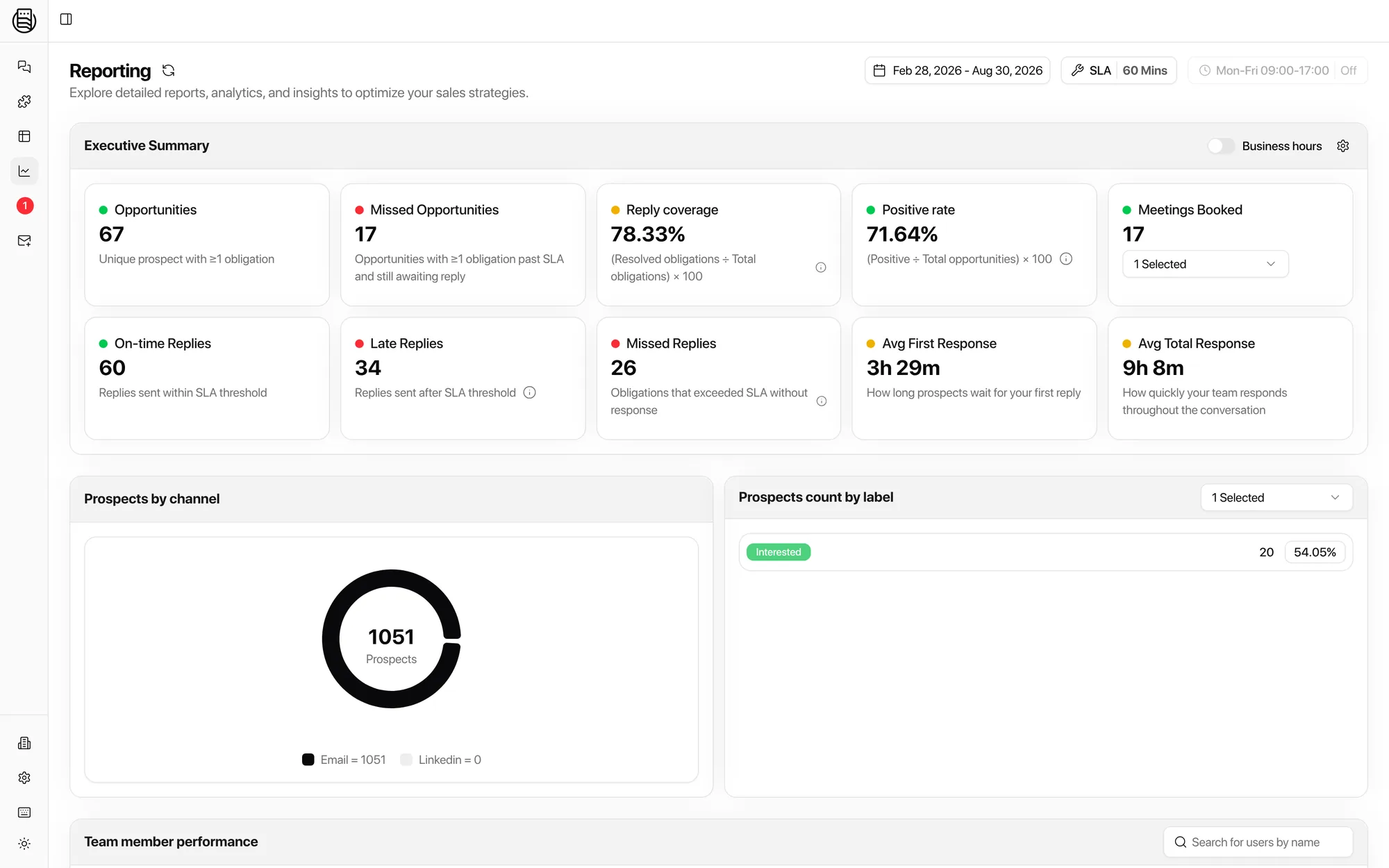
An SLA you can hold people to
Set the window a reply has to be answered in. Every reply carries a timestamp and an owner from the second it lands.
On time versus late, at a glance
Late replies do not hide in a folder. They sit on the same screen as the ones handled in minutes, so a slipping week is visible on Tuesday, not at month end.
Per rep, not just per team
Reply speed and meetings booked broken out by rep, so a coaching conversation starts with a number instead of a hunch.
Three chores, deleted.
None of this is selling. All of it is what a rep does today between the reply arriving and the reply being answered.
Scrolling the unibox looking for something worth answering
Intent tags sort the queueEvery reply is classified as it lands, so interested is already at the top when the rep opens the inbox.
Alt-tabbing to LinkedIn for the other half of the conversation
One thread per prospectLinkedIn replies thread next to email on the same prospect, across every sending account, in the same inbox.
Forwarding hot leads to whoever might own them
Routing rules and alertsThe right owner is assigned as the reply arrives, with an alert. No forwarding chain, no lead sitting in a folder nobody checks.
“I had 200 positive replies in three weeks and no answer for where the revenue was. Then I put every reply in one place. My life has gotten so much less stressful.”
Questions outbound teams ask
Do we replace our sequencer?
No. Your sequencer keeps sending campaigns exactly as it does today. Master Inbox sits on top and handles what comes back: every reply, threaded, tagged, and routed.
What are the replies our sequencer never shows us?
Sequencers only track replies that come back in the exact thread they sent. A prospect who forwards to a colleague, CCs someone new, or answers from a different address falls out of that view. Master Inbox catches those too.
See the unified inboxHow fast can reps actually start using it?
Onboarding is white-glove. We connect your mailboxes and LinkedIn accounts with you, then run weekly sessions through your first month so reps adopt it, not just log in.
Does it track response times per rep?
Yes. Every reply gets a timestamp and an owner, so you can see reply speed per rep and catch who is sitting on hot leads before they go cold.
See reporting on speed to leadI manage the team. What do I actually get to see?
Everything, in one place. Most managers have no visibility into what reps say across mailboxes, shared inboxes, and LinkedIn. Master Inbox shows every conversation as a master thread: the full history of a prospect across campaigns and channels, in real time, without digging through the CRM. Round-robin assignment spreads leads across reps and territories, and you see who owns what.
Which CRMs sync without custom tooling?
Close, HubSpot, Salesforce, Attio, and others connect from Settings, no Zapier or custom code. Contacts, conversations, and stages sync as replies are worked.
See every integrationWhat does it cost?
Seats are unlimited on every plan. Pricing scales with the number of mailboxes you connect, not headcount.
See pricingStop losing the replies you paid to earn.
See how outbound teams turn scattered replies into booked meetings.
20 minutes, live with your own mailboxes. No setup before the call.