
Smartlead's inbox shows you some of your replies. Master Inbox shows you all of them.
Smartlead's inbox is a tab that lists replies to the campaigns Smartlead sent, in one workspace at a time. Forwards, CC replies, new addresses, replies after the sequence ends: it never sees them. Master Inbox reads every mailbox you send from, across every Smartlead workspace and every LinkedIn tool, and works every reply in one queue. Smartlead keeps sending.
Free 7-day POC. Unlimited users on every plan. Smartlead stays your sending tool.
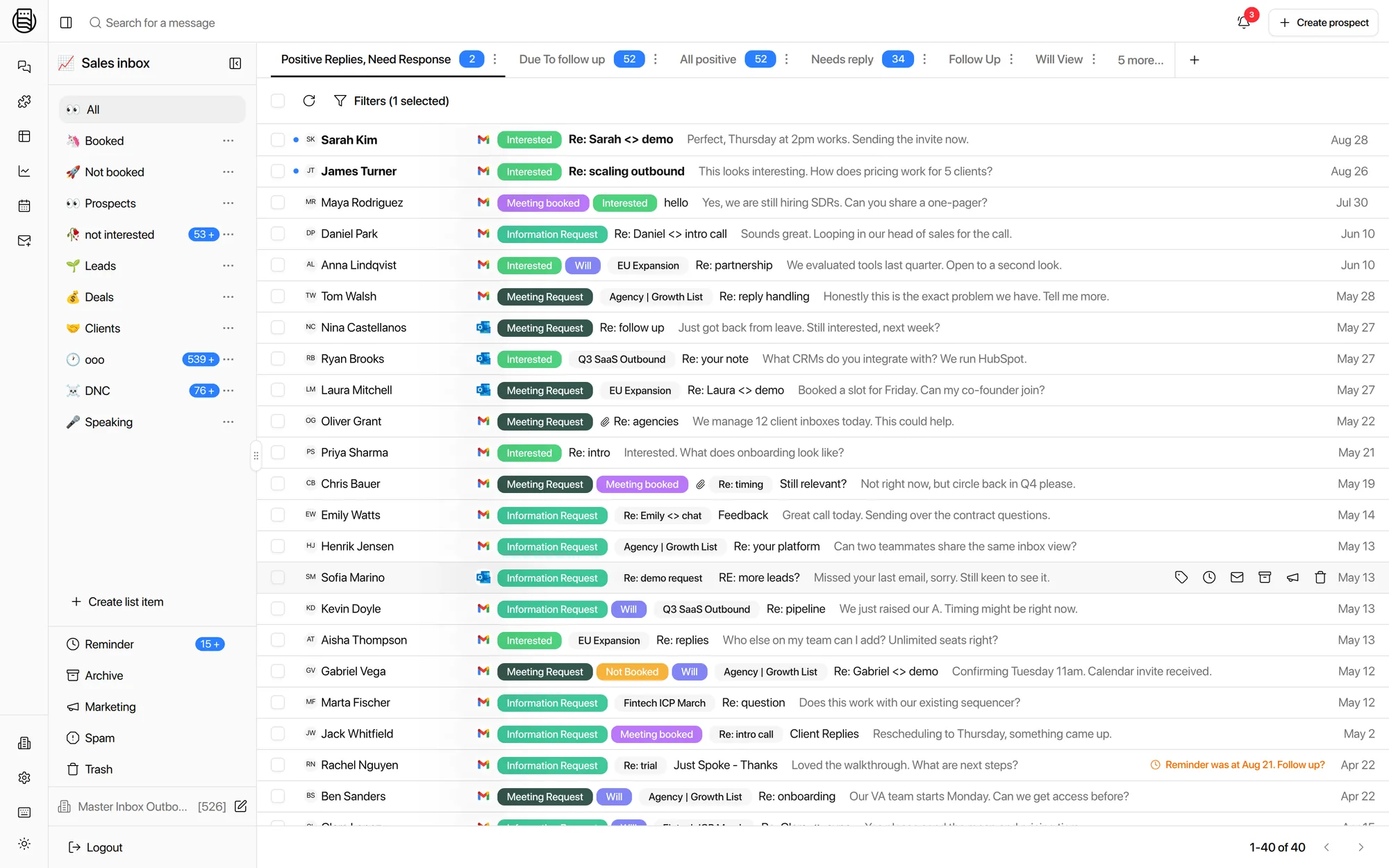
What is Smartlead's inbox, really?
A tab inside a sending tool, not a reply system. Three things to know before you trust it with your pipeline.
It shows replies that land on the exact thread Smartlead sent. Anything else, a forward, a CC, a new address, a late reply, does not exist to it.
An agency with twenty clients has twenty Smartlead inboxes behind a workspace switcher. There is no queue across them and no view of who owes a reply.
No LinkedIn. The HeyReach, Expandi or Aimfox replies to the same prospect live in another tool, and the SDR stitches the conversation together by hand.
If your team works replies only in Smartlead's inbox, you are missing replies today. Not maybe. Today.
Six replies the Smartlead inbox never shows you
Every one of these came up on a sales call in the last six months. Smartlead will not call any of them a bug: its inbox can only show what Smartlead sent for. That is the design, and it is exactly why replies go missing.
Your prospect forwards the email to a colleague, who replies from their own address. Smartlead has no campaign for that address, so the reply is not a reply.
Master Inbox: reads the mailbox, threads it to the original prospectThe prospect adds their assistant, or answers from a second account. Same conversation, different sender, invisible to campaign attribution.
Master Inbox: one Master Thread per prospect, whoever writesReplies to the reply-to address on your main domain land in a mailbox Smartlead is not tracking. One in-house team found their reply capture and analytics both broke this way.
Master Inbox: connect that mailbox too, it is just another channelA prospect answers three weeks after the sequence ended, to a step that is no longer active. Agencies running ten Reply or Smartlead workspaces told us these are the ones they lose.
Master Inbox: a reply is a reply, sequence or no sequenceA mailbox drops out of rotation or loses its connection. Replies keep arriving in it. Nothing downstream of the sequencer knows.
Master Inbox: an email_disconnected event, and a reply agent that keeps readingSmartlead to webhook to Zapier to Slack is how most teams hear about a reply. Each hop drops the cases above, and the message in Slack has no draft and no thread.
Master Inbox: a Slack card with the drafted reply and an Accept buttonInternal data across connected workspaces puts the replies a sequencer never reports at roughly 12% of the total. The forward and the new address are most of it. How to count yours.
"You're telling me that all these native platforms, like Smartlead, Instantly, they just miss replies?"Adrian B., agency founder, on a demo call. His team booked from every reply because they sold meetings, not free offers.
Smartlead's inbox at twenty clients: twenty tabs and a switcher
Agencies do not have a Smartlead inbox. They have twenty of them, one per client, each behind a workspace switch, and nobody can see the whole picture.
- Clunky for SDRs. A rep working replies across clients is switching workspaces all day, with no keyboard-first queue, no assignment and no way to know what is theirs. The people closest to the revenue get the worst tool.
- No workflow engine. Meeting booked should stop the sequence, ping Slack and update the CRM. In Smartlead that is a webhook out to Zapier and a prayer. In Master Inbox it is one workflow with eighteen triggers.
- CRM sync is thin. Push a lead to HubSpot, yes. Keep the whole conversation on the contact record, reply from HubSpot through the sending mailbox, and sync labels both ways: no.
- No custom views or real filtering. Needs Reply, waiting on me, no reply in 48 hours, this week's positives per client: none of these exist in Smartlead's inbox. You get campaign filters.
- No queue across clients. An inbox manager covering ten workspaces opens ten tabs and asks each one who owes a reply. One agency asked us, straight out, whether there was a master inbox or whether managers had to keep switching. That question is the product.
- Views stop at the workspace. Needs Reply, waiting on me, no reply in 48 hours: Master Inbox runs these across every workspace with the client name on each row, or scoped to one client for a client login.
- Labels stay local. Smartlead categories live in Smartlead. Master Inbox labels are applied by AI on your own key, sync back to Smartlead both ways, and drive views, workflows, reporting and reply agents.
- Reporting counts campaigns, not people. Smartlead reports on sends and reply rates. Master Inbox reports on obligations: who owes a reply, how long it waited, per rep and per client, against the SLA you set.
Side by side
What each one sees and does. The Smartlead column is what its own docs describe; the Master Inbox column is what ships today.
| Smartlead's inbox | Master Inbox | |
|---|---|---|
| Replies it sees | Replies to Smartlead campaigns, from the address the campaign wrote to | Every reply in every connected mailbox, including forwards, CC, new addresses and replies after the sequence ended |
| Channels | Email plus LinkedIn from HeyReach, Expandi, Aimfox and native seats, threaded per prospect | |
| Workspaces | One at a time | All at once, or scoped per client for a client login |
| Labels | Smartlead categories | AI labels on your own key, custom taxonomy, synced back to Smartlead both ways |
| Views | Per workspace, per campaign | Needs Reply, waiting on me, 48 hours silent, per client, per rep, saved and shared |
| Automation | Webhooks out to your own tools | Workflows inside: Slack card with draft and Accept button, HubSpot sync, remove from or pause the Smartlead campaign, reminders, forwards, webhooks |
| Answering | Manual, quick replies | Manual, from Slack, from HubSpot, or reply agents with human-in-the-loop, booking on Cal.com, Calendly, Chili Piper, GoHighLevel, Google Calendar or HubSpot |
| Reporting | Sends, opens, reply rates per campaign | Reply coverage, missed replies, response times per rep and per client against an SLA with business hours |
| Client access | A Smartlead client login | A workspace-scoped login, forwarded positives, or a scheduled view report with no login |
| Pricing model | Included with Smartlead | Per client workspace or per mailbox, unlimited users, free 7-day POC |
Smartlead sends. Master Inbox handles the replies.
Use Smartlead for what it is good at, sending, and stop using its inbox for what it is not. Three steps on the first call.
Connect
Smartlead by API key or OAuth, plus the mailboxes themselves, in bulk from Zapmail, InboxKit or HyperTide or by CSV. Account-level webhooks act as a second safety net.
Label and sync
AI labeling backfills history on your own key. Label sync runs both ways, and you choose which labels are allowed to push back into Smartlead.
Automate the hand-offs
Meeting booked removes the prospect from the campaign. Not interested unsubscribes everywhere. Interested lands in the client's Slack channel with a draft.
Smartlead is a good sending tool: unlimited mailboxes, rotation and warm-up are its job. It is not a reply tool, and the inbox tab is where your pipeline leaks.
What Smartlead teams told us on calls
Paraphrased from six months of demos and onboarding calls, with names left out.
- A three-SDR team found replies showing in Smartlead but nowhere downstream whenever a mailbox rotated, and wanted alerts on rotation and disconnects.
- An in-house team's replies to their main reply-to domain never registered in Smartlead, breaking both capture and analytics.
- A PE-focused agency had operators watching 30 to 40 inboxes each in browser tabs, with forwarding chains breaking threads and hitting provider limits.
- An agency asked for exact label parity with Smartlead, plus DNC and booked rules, so reporting would not drift between the two tools.
- Several agencies wanted the meeting-booked event to pause or remove the prospect from the Smartlead campaign automatically. That is one workflow now.
- More than one team's Slack feed came from Smartlead webhooks and was described as messy, with no way to reply from it.
Compared against Smartlead's public documentation, last checked 21 September 2026. Smartlead is a trademark of its owner; Master Inbox is an independent product and is not affiliated with Smartlead.
Explore more: Smartlead + Master Inbox, Smartlead alternative, Smartlead integration, Missed replies
Questions we get
Is Master Inbox the same as the inbox in Smartlead?
Will I keep missing replies if I only use Smartlead's inbox?
Does Master Inbox replace Smartlead?
Do labels sync both ways?
Does it read the mailbox or the Smartlead webhook?
What about warm-up emails?
What does it cost next to Smartlead?
See it on your own inboxes
Book a demo. We connect your Smartlead workspace live and count the replies Smartlead's inbox never showed you.
Start your free 7-day POC