
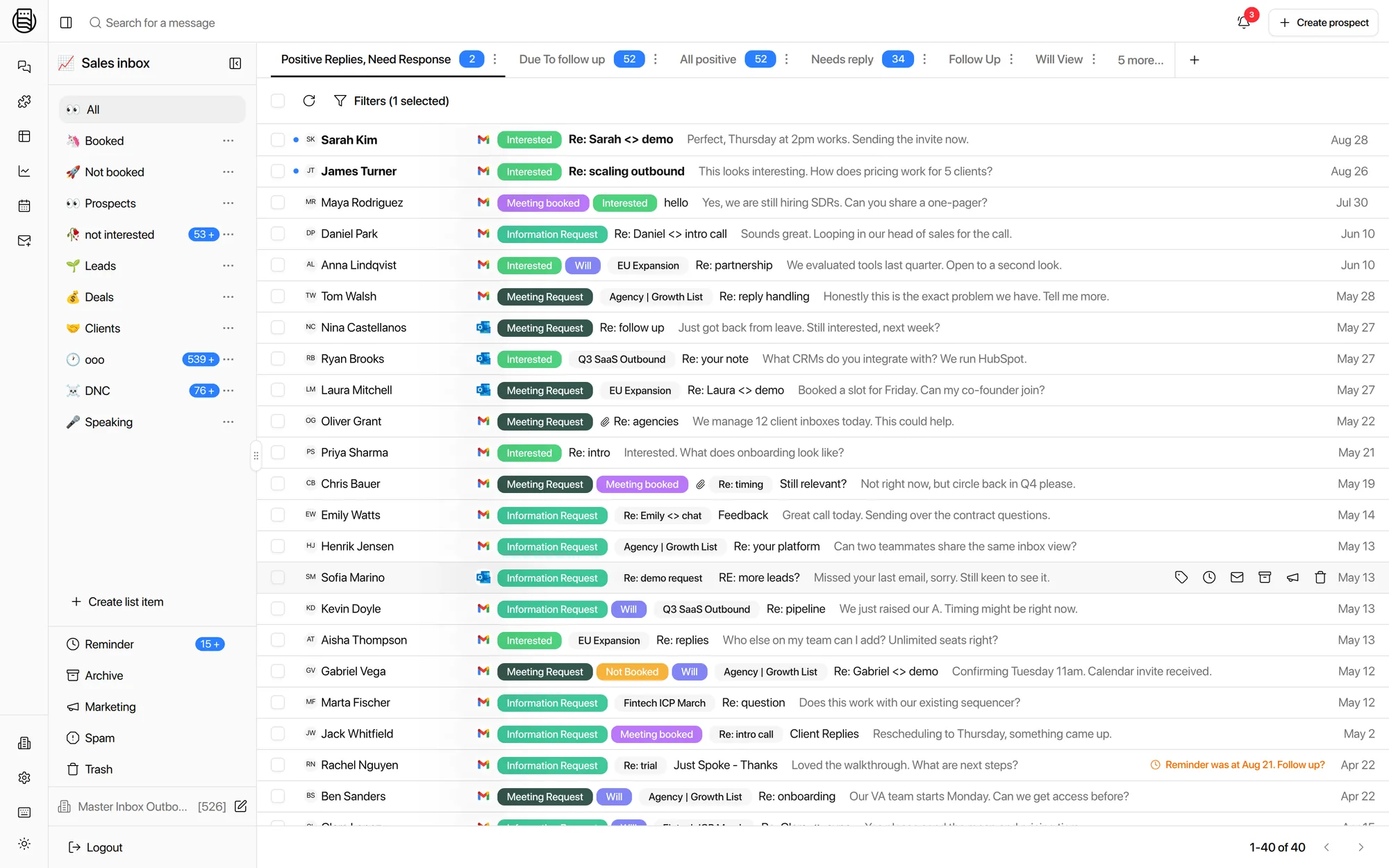
Instantly's Unibox misses replies. Master Inbox catches every one.
Unibox lists replies to the campaigns Instantly sent, in one workspace at a time. Forwards, CC replies, new addresses, replies after the sequence ends: it never sees them. At twenty clients it is twenty Uniboxes behind an account switch. Master Inbox reads every mailbox across every Instantly account and works every reply in one queue. Instantly keeps sending.
Free 7-day POC. Unlimited users on every plan. Instantly stays your sending tool.
What is Instantly's Unibox, really?
A reply tab inside a sending tool, not a reply system. Three things to know before your pipeline depends on it.
It shows replies that land on the thread Instantly sent. A forward, a CC, a new address or a late reply has no campaign to attach to, so Unibox never shows it.
Twenty clients means twenty Uniboxes behind an account switch. No queue across them, no view of who owes a reply, and an inbox manager who cannot see what is slipping.
No LinkedIn in the thread. And one AI reply setting for every client, which is why agencies turned it off after clients complained.
Agencies told us the same thing in different words: Unibox holds at four or five clients and falls apart at twenty. If your reps work replies only in Unibox, they are missing replies today.
Six replies Unibox never shows you, and where it breaks
From agencies and in-house teams on calls in the last six months. Instantly will not call any of these bugs. Unibox can only show what Instantly sent for, and that is the whole problem.
Forwards, CC replies and answers from a new address have no campaign to attach to. One team tried forwarding every mailbox into one Gmail to catch them; threads broke and the misses stayed.
Master Inbox: reads each mailbox directly and threads by prospectAt twenty clients, an agency described missing emails and labels that disappeared, with one inbox manager covering ten workspaces and worried about what was slipping.
Master Inbox: labels are yours, applied on your key, kept on the threadClients on separate Instantly accounts mean one person switching accounts to triage 50 or 60 inboxes. Assistants need something simpler than the Unibox to work in.
Master Inbox: one queue across every account, scoped views per clientAgencies that run multiple clients inside one Instantly account need labels, warm-up tags and campaign data synced without one client's replies bleeding into another's view.
Master Inbox: workspace isolation, with sync scoped per workspaceTwo agencies moved off Instantly's AI reply because clients disliked losing control and the agent could not be tuned per client. Human-in-the-loop, per label, is the ask.
Master Inbox: reply agents that draft first, go autonomous per label, on your promptWarm-up replies pollute views and trip workflows unless something strips them before labeling.
Master Inbox: exclusions hide warm-up tags before anything sees themInternal data across connected workspaces puts the replies a sequencer never reports at roughly 12% of the total. How to count yours.
What Unibox does not have
The gaps agencies hit once the client count grows. None of them is on Instantly's roadmap as far as its docs show.
- A queue across clients. Unibox is one workspace at a time. There is no single list of who owes a reply across twenty clients, and no assignment per rep.
- Custom views and real filtering. Needs Reply, waiting on me, no reply in 48 hours, this week's positives per client: you get campaign and label filters, nothing saved, nothing shared.
- A workflow engine. Meeting booked should stop the sequence, post to Slack and update the CRM. In Instantly that is a webhook out to Zapier. In Master Inbox it is one workflow.
- A CRM sync worth the name. Pushing a lead to HubSpot is not the same as keeping the conversation on the contact record and replying from HubSpot through the sending mailbox.
- LinkedIn. The HeyReach or Expandi thread with the same prospect lives somewhere else. Your SDR stitches it together by hand.
- An SDR-grade interface. Offshore assistants and SDRs need a fast, simple queue with obligations, not a campaign dashboard with a reply tab.
Side by side
What each one sees and does. The Unibox column is what Instantly's own docs describe; the Master Inbox column is what ships today.
| Instantly Unibox | Master Inbox | |
|---|---|---|
| Replies it sees | Replies to Instantly campaigns | Every reply in every connected mailbox, including forwards, CC, new addresses and replies after the sequence ended |
| Channels | Email plus LinkedIn from HeyReach, Expandi, Aimfox and native seats, threaded per prospect | |
| Accounts and workspaces | One Instantly workspace at a time | Every Instantly account and workspace in one queue, isolated per client |
| Labels | Instantly labels | AI labels on your own key, custom taxonomy, synced to Instantly with an allow list of which labels push back |
| Views | Per workspace | Needs Reply, waiting on me, 48 hours silent, per client, per rep, saved and shared |
| AI replies | Instantly's AI reply | Reply agents per client or per campaign, human-in-the-loop first, autonomous per label, on your prompt and key |
| Automation | Webhooks out | Workflows inside: Slack card with draft, HubSpot sync, add to or remove from Instantly sequences and subsequences, reminders, forwards, webhooks |
| Booking | Via your calendar link | Agent books on Cal.com, Calendly, Chili Piper, GoHighLevel, Google Calendar or HubSpot from live availability |
| Reporting | Campaign analytics | Reply coverage, missed replies, response times per rep and per client against an SLA |
| Client access | An Instantly client login | A workspace-scoped login, forwarded positives, or a scheduled view report with no login |
Instantly sends. Master Inbox handles the replies.
Use Instantly for what it is good at, sending, and stop running your pipeline through Unibox. Three steps on the first call.
Connect
Instantly by API key or OAuth, plus the mailboxes themselves, in bulk from Zapmail, InboxKit or HyperTide or by CSV. One workspace per client, even if they share an Instantly account.
Label and sync
AI labeling backfills history on your own key. Label sync to Instantly uses an allow list, so a manually set state in Instantly is not overwritten unless you say so.
Automate the hand-offs
Meeting booked removes the prospect from the Instantly sequence. Interested lands in the client's Slack channel with a draft. Not interested moves to a nurture subsequence three months out.
Instantly is a good sending tool: unlimited accounts, warm-up and deliverability are its job. It is not a reply tool, and Unibox is where your pipeline leaks.
What Instantly teams told us on calls
Paraphrased from six months of demos and onboarding calls, with names left out.
- An agency at twenty clients described Unibox as reliable at four or five and unmanageable past that, with missing emails and tags that did not hold.
- An in-house team with 250 mailboxes and offshore assistants needed an interface simple enough for assistants, with obligations (who owes a reply) rather than vanity metrics.
- Two agencies replaced Instantly's AI reply because clients wanted control back and the agent could not be tuned per client.
- A team running several clients in one Instantly account needed labels and warm-up tags synced without cross-client bleed.
- One operator triaging 50 to 60 inboxes across Instantly accounts wanted phone-found and SDR-to-call hand-offs pushed to callers automatically.
- Several asked for a bidirectional label sync where they choose which labels are allowed to push back into Instantly.
Compared against Instantly's public documentation, last checked 21 September 2026. Instantly is a trademark of its owner; Master Inbox is an independent product and is not affiliated with Instantly.
Questions we get
Does Master Inbox replace Instantly?
Why do replies go missing from Unibox?
Will I keep missing replies if I only use Unibox?
Can several clients share one Instantly account?
Do labels sync back to Instantly?
What about Instantly's own AI reply?
What does it cost next to Instantly?
See it on your own inboxes
Book a demo. We connect an Instantly workspace live and show you the replies Unibox never had.
Start your free 7-day POC