
The better unibox is Master Inbox
Your sequencer's unibox shows its own sending, in one workspace, email only, and misses the forwards, CC replies and new-address replies it never sent. Master Inbox reads the mailbox itself: every sequencer, every workspace, and LinkedIn in one inbox with Needs Reply views, labels and routing.
Free 7-day POC. Unlimited users on every plan. Works with Smartlead, Instantly, EmailBison, Reply.io, Lemlist and more.
What is a unibox, and what makes this one better?
A unibox is one inbox for every sequencer and every LinkedIn tool you send from. Master Inbox is the unibox that also reads the mailbox itself, so it catches the forwards and CC replies no campaign inbox shows, and labels every reply the moment it lands.
What is a unibox in cold email?
A unibox is a single inbox that gathers every reply your cold email and LinkedIn outreach generates, no matter which sequencer sent it or which mailbox it landed in. Smartlead and Instantly each ship a unibox scoped to their own sends. Master Inbox is a unibox that reads every sequencer and every mailbox at once.
The gap nobody measures
Which replies does a sequencer's inbox miss?
A sequencer's inbox only shows replies that land back on the exact thread it sent. It misses replies forwarded to a colleague, CC'd onto a new thread, sent from an out-of-office chain, or sent from a changed email address. Connecting mailboxes directly, the way Master Inbox does, catches all of them.
A prospect forwards you to their colleague. Someone CCs a second decision maker. An out-of-office chain hides a "talk to Maria instead". A contact leaves and the reply comes from a new address. All of those are the hottest messages you have, and all of them can miss the tool that sent the campaign.
more replies captured when mailboxes connect directly to Master Inbox, on top of what the sequencer reports. Based on our internal data across connected mailboxes.
What comes in from each source
Connect by API key in minutes. Nothing changes about how you send.
Every reply from every client workspace at once, with campaign and mailbox attribution. Labels sync both ways, so statuses never drift.
Replies from all your workspaces in one list, campaign attributed, without cycling through separate logins.
Replies plus lead status, kept in step with Master Inbox labels in both directions.
Reply threads with the sequence and step they came from attached to each conversation.
Email and LinkedIn steps land on the same prospect, in the same thread.
HeyReach, Expandi, Aimfox, Salesflow and the rest: conversations from every seat, threaded next to that prospect's email.
Inbound submissions with every answer mapped to lead fields, matched against your outbound history on arrival.
Google and Microsoft by OAuth, IMAP for the rest, plus one-click imports from Zapmail, HyperTide, ScaledMail, InboxKit, MailDoso and Cheap Inboxes. This is where the missed replies come from.
Teams routinely connect hundreds of mailboxes. The largest run tens of thousands. One operator, one screen.
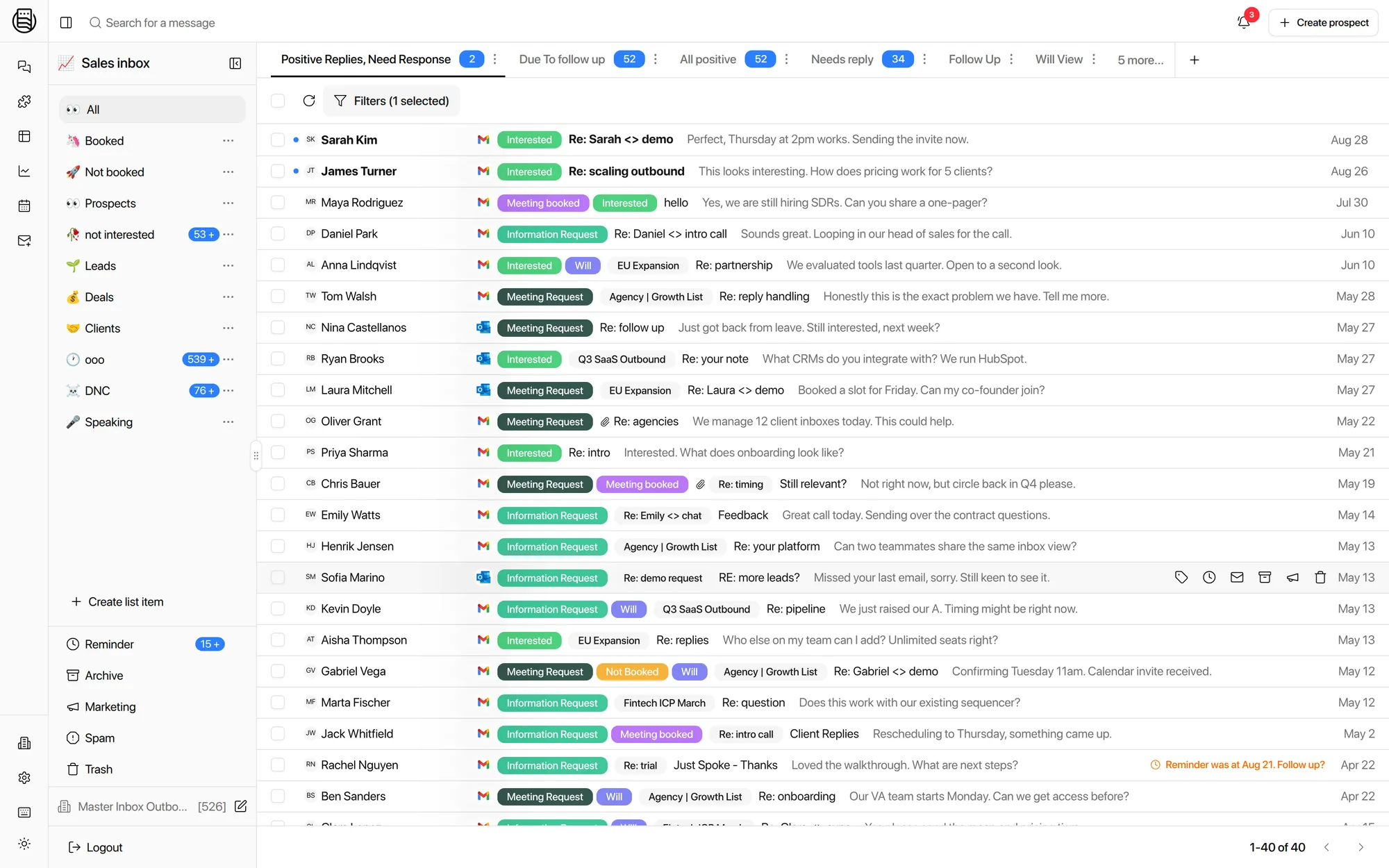
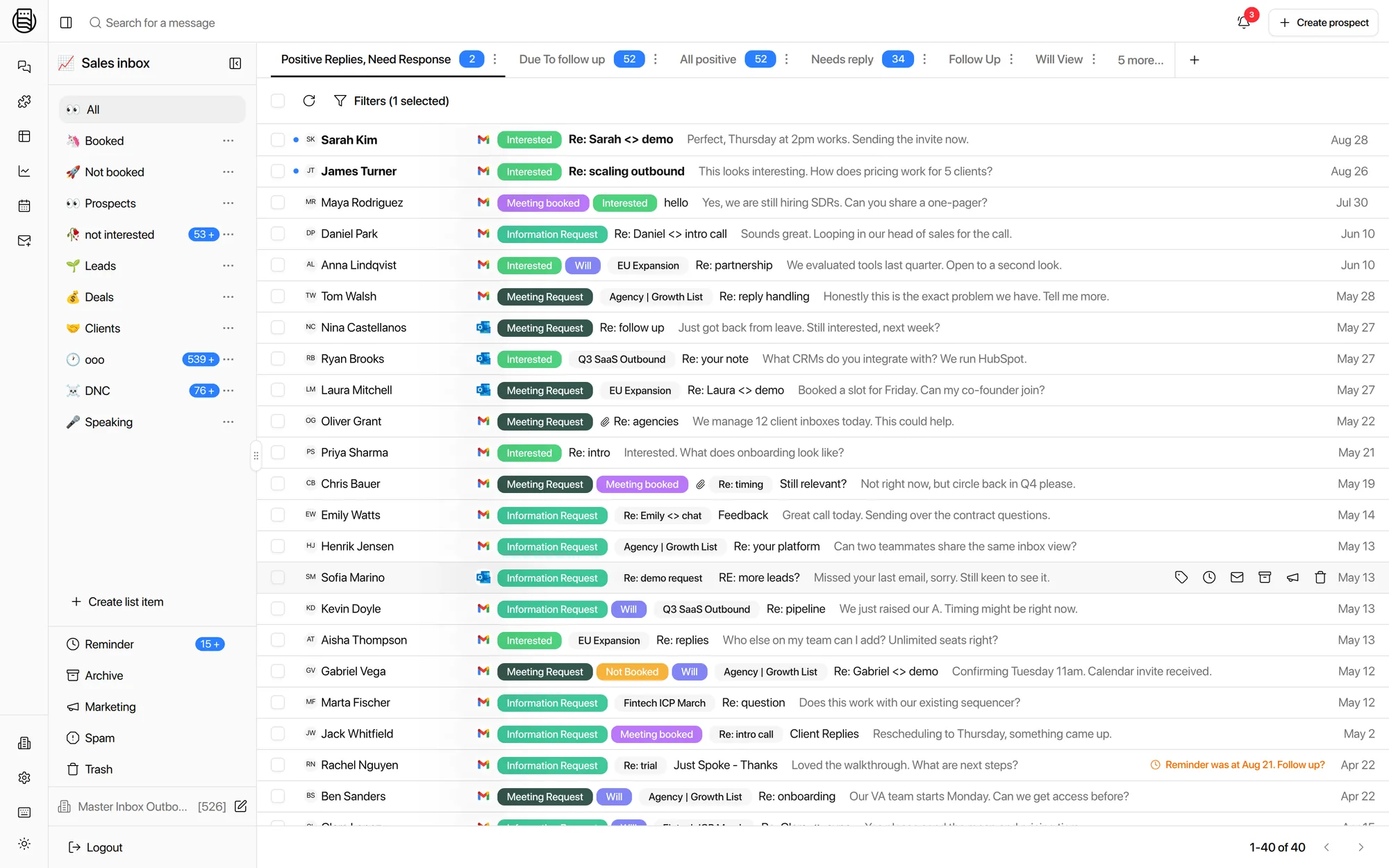
Real product: filters and saved views on live reply data.
Views and filters
Save the question, not the search
Filter by client, campaign, mailbox, channel, label, or owner. Save the combination as a view and it becomes a queue your team works every morning.
- By clientOne view per client workspace for the inbox manager who runs it, with permissions so they see nothing else.
- By campaignWatch a launch on its own: every reply from that campaign only, across all mailboxes it sent from.
- By intentInterested and meeting requests in one view, answered first. Out-of-office and not-now filtered out until they matter.
Where the master inbox came from
Before it was a category, it was a workaround.
In 2019 the standard way to watch replies across 50 sending mailboxes was a forwarding rule on each one, all pointed at a single address. Threads broke, and every forward spent sending volume from the mailbox you were trying to protect. The first Master Inbox, shipped that year as the v1 inbox inside OutreachBin, pulled mail directly from every mailbox instead. Sequencers later added their own reply views, and Smartlead even named theirs "master inbox", but they read only the mail their campaigns sent. Reading everything in the mailbox, including the forwards, CCs, and new-address replies, is by our estimate roughly eight times the processing work. That work is the product.
Eight logins, or one
Same replies, same team, different morning.
Eight logins, checked twice a day, and the forwarded reply still gets missed.
One screen, filtered to whichever slice you are working, with labels applied on arrival.
Explore more: Reply Agents, LinkedIn Inbox, every integration, what a unibox is, pricing
Questions we get
How is this different from Smartlead's inbox or Instantly's Unibox?
Which sequencers does it work with?
What replies does a sequencer inbox miss?
Does Master Inbox have a mobile app?
How do mailboxes connect?
Can clients get their own view of the unibox?
Does labeling sync back to my sequencer?
Is it priced per seat?
See it on your own inboxes
Book a demo and watch replies from every sequencer and mailbox land in one inbox.
Start your free 7-day POC