
Master Inbox vs Hiver: Which one should you choose?
On this page
- Key differences (the 5 things that matter most)
- Category fit: what these tools are (and what to evaluate)
- Quick verdict (best for, strengths, tradeoffs)
- Side-by-side comparison (category-specific criteria)
- Deep dive: Master Inbox (where it wins / where it doesn’t)
- Deep dive: Hiver (where it wins / where it doesn’t)
- Pricing comparison (how to think about cost)
- Integrations & workflows (how each fits your stack)
- Implementation & switching (from Hiver → Master Inbox)
- Common objections (and what’s true)
- Who should choose Master Inbox?
- Who should choose Hiver?
- 60-second decision checklist
- FAQs
- Final recommendation
- More questions people ask
Choosing the right tool to manage customer and prospect communication is a critical decision for any B2B team. In the debate of Master Inbox vs Hiver, it's easy to get confused, as both promise a more organized inbox. However, they solve fundamentally different problems for different teams. This article will break down the key differences to help B2B SaaS founders, SDR/BDR teams, and RevOps leaders decide which platform is the right fit for their workflow.
This comparison will guide you through features, use cases, and pricing, clarifying whether you need a tool for managing outbound campaign replies or an internal shared inbox for inbound communication.
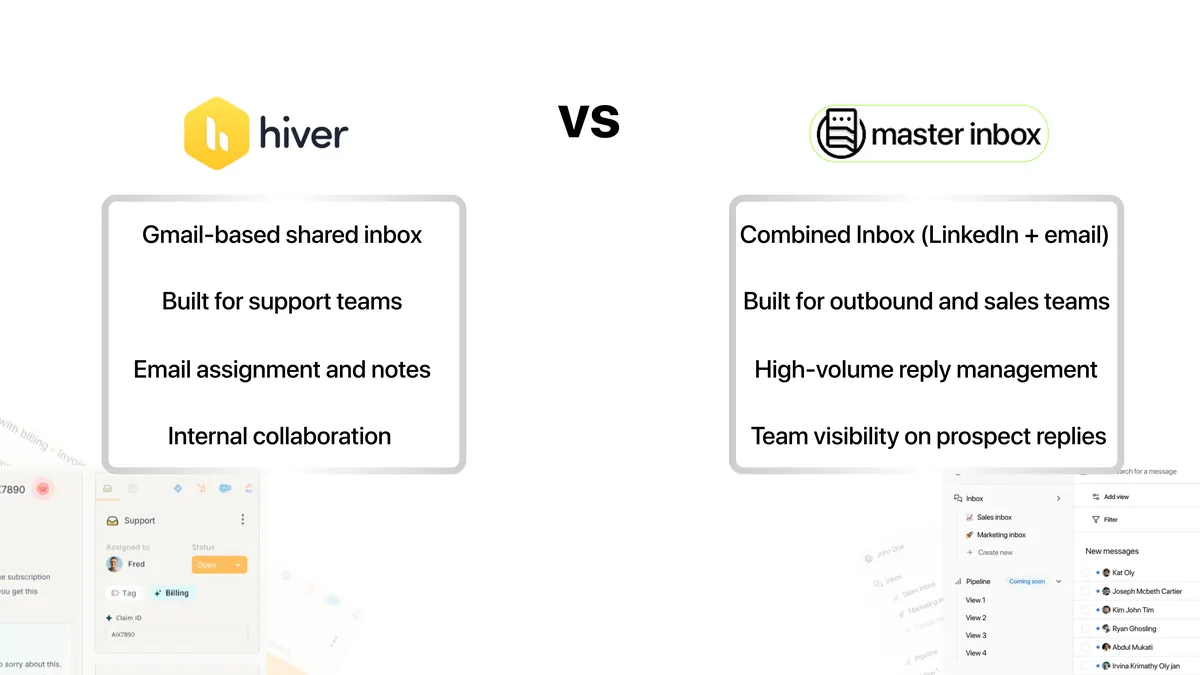
Key differences (the 5 things that matter most)
- Primary Use Case: Master Inbox is built for outbound sales teams to manage replies from prospecting campaigns. Hiver is built for inbound support and sales teams to manage shared company email addresses.
- Platform Architecture: Master Inbox is a standalone platform that integrates with and sits on top of your existing sales sequencers. Hiver is a Chrome extension that transforms the native Gmail interface into a helpdesk.
- Channel Support: Master Inbox is designed to combine LinkedIn + Email replies into one unified feed. Hiver is primarily email-focused, with add-on capabilities for live chat and WhatsApp.
- Integration Philosophy: Master Inbox connects to outbound sending tools (e.g., Lemlist, Smartlead) to catch their replies. Hiver integrates with CRMs and internal tools like Asana or Jira to manage customer data within Gmail.
- Ideal User: The Master Inbox user is an SDR, BDR, or agency managing high-volume outbound. The Hiver user is a customer support agent or a sales rep handling inbound leads in a shared inbox.
Category fit: what these tools are (and what to evaluate)
Both tools fall into the broad category of communication management software, but they serve distinct sub-categories. To evaluate them, we'll use these criteria:
- Core Function: What is the single most important job the tool does?
- Platform: Where does the tool live and how do you access it?
- Channel Coverage: Does it handle just email, or also LinkedIn and inbound leads from forms?
- Key Integrations: What tools does it connect with to create a complete workflow?
- Collaboration Features: How does it help teams work together without collision?
- Ideal Team Structure: Is it for siloed reps, collaborative pods, or entire departments?
- Pricing Model: How is cost calculated?
Quick verdict (best for, strengths, tradeoffs)
| Category | Master Inbox | Hiver |
|---|---|---|
| Best for | Centralizing replies from multi-channel outbound campaigns. | Managing shared Gmail inboxes for support and sales teams. |
| Biggest strength | Aggregating replies from disparate sales sequencers. | Seamless collaboration directly within the Gmail UI. |
| Biggest tradeoff | Requires existing outbound tools to be useful. | Locks your team into the Gmail/Google Workspace ecosystem. |
| Time-to-value | Fast, connects to existing tools in minutes. | Medium, requires team adoption and workflow setup. |
| Pricing approach | Per-seat and per-connected inbox. | Per-user, with feature-based tiers. |
In short, your choice depends entirely on the source of your messages. If you're generating leads through outbound prospecting across multiple platforms, Master Inbox is built specifically for your workflow. If your business relies on responding to inbound emails sent to a central address, Hiver is the more logical fit.
Side-by-side comparison (category-specific criteria)
| Criteria (what matters) | Master Inbox | Hiver | Notes / proof |
|---|---|---|---|
| Core Function | Outbound Reply Management | Inbound Shared Inbox | Master Inbox is a specialized SDR Reply Handling Service, while Hiver turns Gmail into a helpdesk. |
| Platform | Standalone Web App | Gmail Chrome Extension | Master Inbox is a central hub; Hiver lives inside an existing tool. |
| Channel Coverage | Email + LinkedIn | Email, Live Chat, WhatsApp | Master Inbox is built for the channels where outbound happens. Hiver focuses on inbound channels. |
| Key Integrations | Lemlist, Smartlead, Instantly, HeyReach, Expandi | Salesforce, Jira, Asana, Slack, Zapier | The integrations reflect the use case: outbound sequencers vs. internal business systems. |
| Collision Detection | Not its primary function | Yes (shows who is viewing/replying) | Hiver excels at preventing two agents from replying to the same inbound email. |
| Analytics Focus | Reply rates, lead status, follow-ups | Response times, resolution rates, SLAs | Master Inbox tracks sales outcomes; Hiver tracks support efficiency. |
Deep dive: Master Inbox (where it wins / where it doesn’t)
Strengths
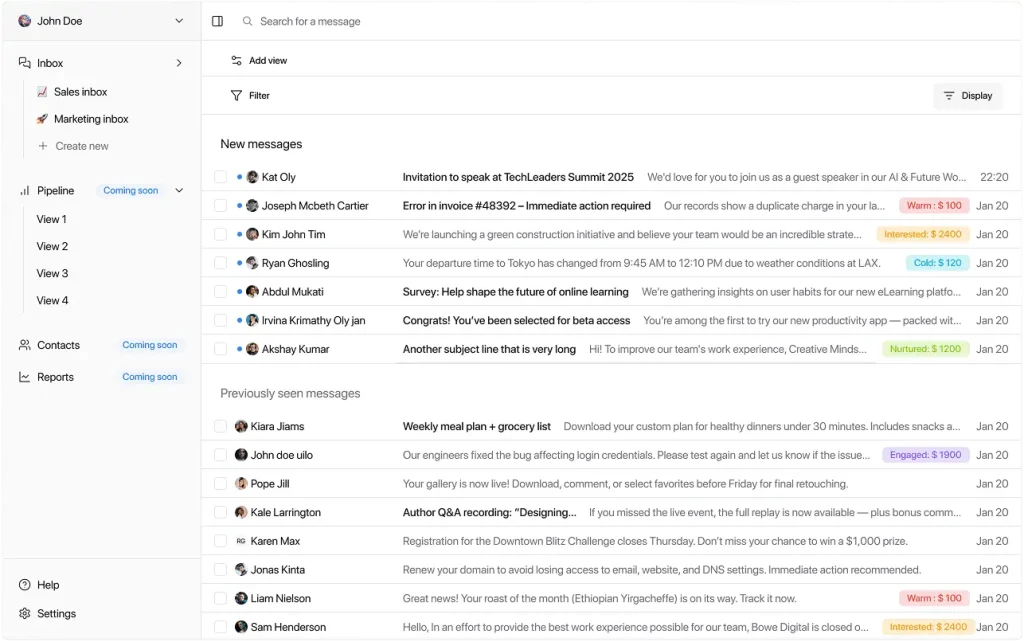
- Unified Inbox: The core value is having one place for all replies. It's a combined inbox for every reply, ending the need to check multiple platforms.
- Prevents Missed Leads: It solves the critical and costly problem of warm replies getting lost in messy primary inboxes or sequencer UIs.
- Multi-Channel Support: Natively combines email and LinkedIn messages, which is essential for modern outbound prospecting.
- Built for Sequencers: It integrates directly with all major outbound tools, including Expandi and HeyReach, to provide perfect context.
- Fast Implementation: You can connect your inboxes and start centralizing replies in minutes, not days.
- Slack Integration: Get instant notifications for new replies, allowing for lightning-fast follow-up.
- Team Collaboration: Assign replies to specific reps and track lead status across the team.
Weaknesses / limitations
- Not a Sending Tool: Master Inbox does not send cold emails; it manages the replies generated by other tools.
- Not for Inbound Support: It is not designed to manage a
support@inbox with features like SLAs or ticketing. - Requires an Existing Stack: Its value is unlocked when you are already using one or more outbound sequencing tools.
- No CRM Functionality: It is not a CRM but can be used alongside one to ensure leads are captured and acted upon.
Ideal use cases
- Lead Generation Agencies: Managing campaigns and replies for multiple clients in one centralized dashboard.
- B2B SaaS Sales Teams: SDRs and BDRs running high-volume, multi-channel outbound sequences.
- Founders & Solopreneurs: Individuals running their own outbound sales efforts who need to stay organized.
- Teams Scaling Outbound: Companies looking to add more reps or channels without letting leads slip through the cracks.
Deep dive: Hiver (where it wins / where it doesn’t)
Strengths
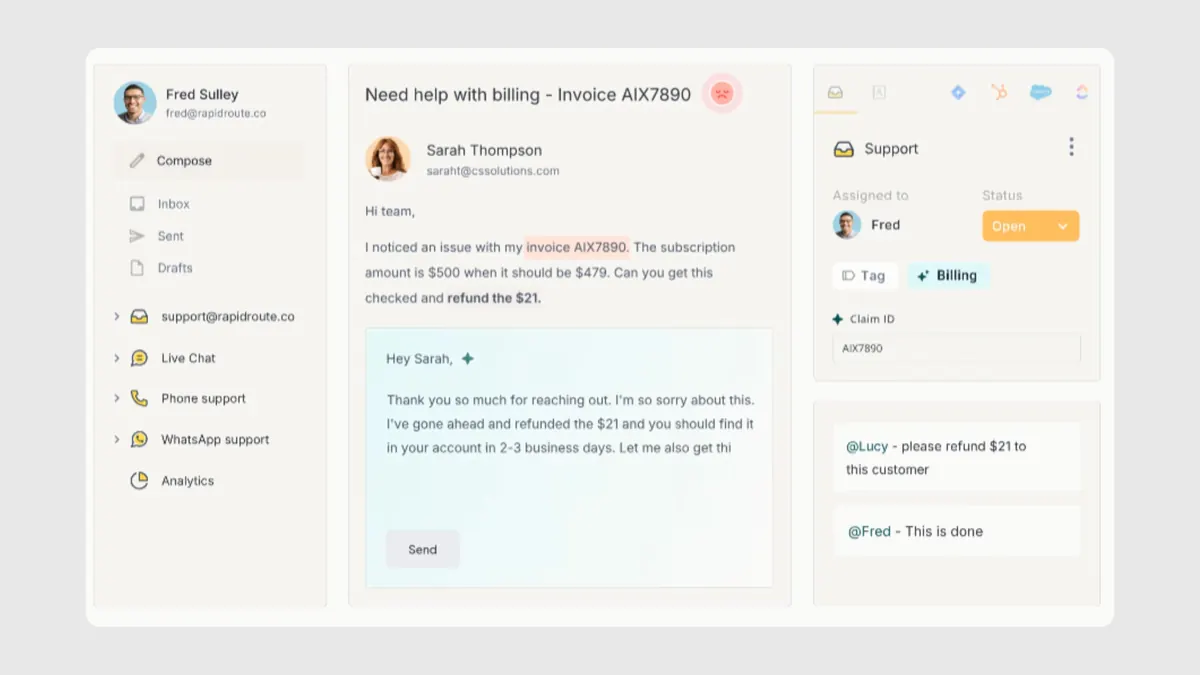
- Deep Gmail Integration: It feels like a natural part of Gmail, making it intuitive for teams already using Google Workspace.
- Strong Collaboration: Features like collision alerts, email notes, and assignments are best-in-class for inbox collaboration.
- Powerful Automations: Can automate repetitive tasks like tagging, assigning, and responding to common queries.
- Robust Analytics: Provides detailed reports on team performance, conversation volume, and customer satisfaction metrics.
- Multi-channel Inbound: Expands beyond email to include live chat and WhatsApp, centralizing customer support channels.
Weaknesses / limitations
- Gmail/Google Workspace Only: It does not work with Outlook or other email clients.
- Not for Outbound Replies: It is not designed to parse and manage replies from outbound sequencers and will struggle with broken threads and lack of context.
- No LinkedIn Integration: Does not connect with LinkedIn for managing sales prospecting messages.
- Can Get Expensive: Pricing is per-user, which can add up quickly for large teams, with key features reserved for higher tiers.
Ideal use cases
- Customer Support Teams: Managing a
support@orhelp@shared inbox with a focus on SLAs and resolution times. - Internal IT/HR: Handling internal requests sent to a central company address.
- Small Business Operations: Managing a
contact@orinfo@inbox with multiple team members.
Pricing comparison (how to think about cost)
Neither Master Inbox nor Hiver competes directly on price, as they offer value in different areas. You should evaluate cost based on the problem you are solving.
Master Inbox uses a model based on the number of users and connected inboxes. This aligns its cost directly with the scale of your outbound operation. The ROI calculation is straightforward: how much is a single missed demo or closed deal worth? If Master Inbox prevents even one high-value lead from being lost, it often pays for itself. You can explore the different tiers on the Master Inbox Pricing page.
Hiver prices on a per-user, per-month basis with several tiers (Lite, Pro, Elite). The cost increases as you need more advanced features like analytics, automations, and integrations. This model is standard for helpdesk software, where value is tied to agent efficiency and customer satisfaction metrics.
Integrations & workflows (how each fits your stack)
An integration strategy reveals a tool's true purpose.
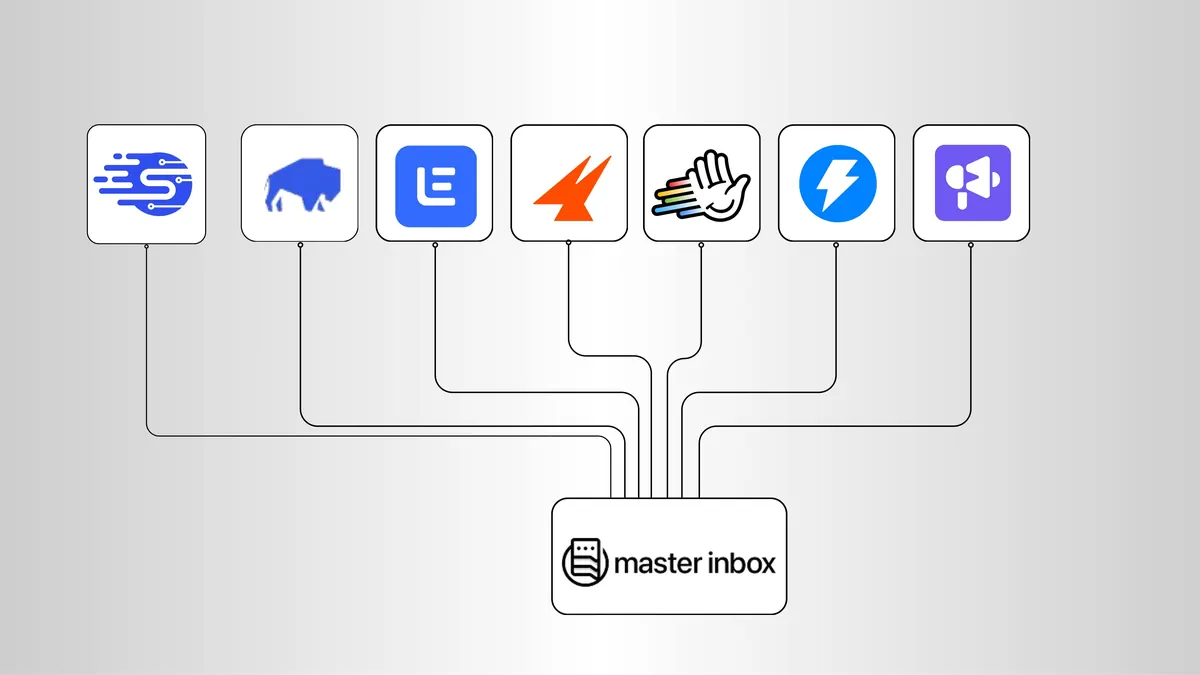
Master Inbox is designed to be the central hub for your outbound stack. It integrates with the tools that send messages, creating a seamless workflow for managing replies. Key integrations include:
- Lemlist
- Smartlead
- Instantly
- HeyReach
- Expandi
- And other popular sales sequencers.
The workflow is simple: your sequencers send campaigns, and Master Inbox catches all the replies in one place for you to act on.
Hiver integrates with your internal systems of record. It connects to CRMs like Salesforce or project management tools like Jira and Asana. The workflow involves taking an inbound email and pushing its data into another system or pulling customer context into Gmail. It enhances an internal process rather than an external one.
Implementation & switching (from Hiver → Master Inbox)
Since these tools serve different functions, you wouldn't typically "switch" from one to the other. Instead, you would add Master Inbox to your stack if you're running outbound campaigns. If you're currently trying to manage outbound replies manually or in a Hiver-like system, here’s how to implement Master Inbox:
- Audit Your Stack: List all the outbound sequencing tools your team uses.
- Sign Up: Get started with a Master Inbox plan that fits your team size.
- Connect Inboxes: Link the email accounts that are receiving replies from your campaigns.
- Connect Seats: Invite your SDRs and assign them to the appropriate inboxes.
- Set Up Notifications: Integrate with Slack to ensure reps are alerted to new replies instantly.
- Centralize Your Workflow: Train your team to stop checking individual sequencer UIs and work exclusively out of Master Inbox for reply management.
- Validate: After 7 days, measure your team's response time and ask them how many replies they would have missed with the old system.
Common objections (and what’s true)
"Can't I just use my email client to manage replies?"
No. Sequencers often break email threads to improve deliverability, meaning replies get de-contextualized. Master Inbox is built to re-assemble these threads, so you always know what campaign a prospect is replying to.
"Is this just another inbox I have to check?"
No, it's the opposite. Master Inbox is designed to be the only inbox you check for outbound replies, replacing the need to log into Lemlist, Smartlead, LinkedIn, and your email client. It's a command center, not another silo.
"Is Hiver a good Master Inbox alternative?"
No, they are not direct alternatives. Hiver is an excellent tool for managing inbound shared inboxes within Gmail. It is not built to handle the specific challenges of outbound reply management, making it a poor fit for that task. You can find a more direct Masterinbox Alternative if that's your goal.
"Is it too expensive?"
Consider the cost of a single missed opportunity. If a warm lead replies but gets lost, you've lost the entire CAC for that lead plus its potential revenue. The value of a tool that prevents this far outweighs its cost. Use a cold email reply rate calculator to understand the financial impact of even small improvements.
"Does it work with my specific outbound tool?"
Master Inbox integrates with the vast majority of popular outbound sequencing platforms. The list is constantly growing, with a focus on supporting the entire modern sales stack.
Who should choose Master Inbox?
- Teams running outbound campaigns on two or more platforms (e.g., email and LinkedIn).
- Sales leaders who are worried that warm leads are slipping through the cracks.
- Agencies that manage outbound prospecting for multiple clients.
- SDRs and BDRs who spend too much time switching between tabs to find replies.
- Companies that want to improve their speed-to-lead for interested prospects.
- Anyone using tools like Smartlead, Instantly, Lemlist, or HeyReach.
- Teams that want a single source of truth for all outbound conversations.
Who should choose Hiver?
- Customer support teams that live in Gmail.
- Companies that need to manage a shared
support@,info@, orsales@email address. - Teams that need to track support metrics like response time and resolution rate.
- Organizations standardized on Google Workspace for all business operations.
- Users who need to collaborate on emails with internal notes and assignments.
- Anyone looking for a helpdesk that feels native to the Gmail experience.
60-second decision checklist
- Do you run outbound campaigns on tools like Lemlist or Instantly? (Yes → Master Inbox)
- Is your main goal to manage a shared
support@inbox? (Yes → Hiver) - Do you need to manage LinkedIn replies alongside email? (Yes → Master Inbox)
- Does your entire team work exclusively within Gmail? (Yes → Hiver)
- Are you worried about warm leads being missed from your outbound efforts? (Yes → Master Inbox)
- Do you need to track customer support metrics like first-response time? (Yes → Hiver)
- Do you manage outbound campaigns for multiple clients? (Yes → Master Inbox)
- Do you need collision alerts to see if a teammate is already replying in Gmail? (Yes → Hiver)
FAQs
What is Master Inbox?
Master Inbox is a unified inbox platform designed for B2B sales teams. It centralizes replies from all your outbound prospecting channels, like email and LinkedIn, into a single command center to ensure you never miss a lead.
What is Hiver?
Hiver is a customer service helpdesk that works directly inside Gmail. It transforms a standard Gmail inbox into a collaborative tool for managing shared email addresses like support@ or sales@.
Can Master Inbox send emails?
No, Master Inbox is not a sending platform. It integrates with your existing outbound sequencers (like Smartlead or Lemlist) to manage the replies they generate.
Does Hiver work with Microsoft Outlook?
No, Hiver is built exclusively for Google Workspace and Gmail. It does not have a version for Outlook.
How does Master Inbox pricing work?
Pricing is typically based on the number of users and the number of connected inboxes you need to manage. This model scales with the size and complexity of your outbound sales operation.
Is Master Inbox a CRM?
No, Master Inbox is not a CRM. It is a specialized reply management layer that complements your CRM by ensuring every interested prospect from your outbound campaigns is captured and engaged with promptly.
Final recommendation
The choice between Master Inbox and Hiver becomes simple once you define your primary goal. They are both excellent tools, but they are not competitors. Hiver is the definitive choice for teams needing to manage inbound communication within a shared Gmail inbox. Its strength is in internal collaboration and turning Gmail into a functional helpdesk.
However, for any team serious about scaling its outbound prospecting, Master Inbox is the clear winner. It is purpose-built to solve the most expensive problem in outbound sales: missed replies from warm leads. By creating a unified master inbox for all your campaigns, it ensures every dollar spent on prospecting has the maximum chance of generating ROI. If your goal is to book more meetings and close more deals from your outbound efforts, you need a system to manage those hard-won replies.
More questions people ask
Is Hiver a good fit for customer support teams managing shared Gmail inboxes?
Yes. Hiver runs inside Gmail and adds assignment, notes, collision alerts and SLAs to a shared support inbox, which is exactly the job it was built for.
Who should use Hiver?
Support, finance and operations teams that live in Gmail and share one company inbox. Teams working cold outbound replies across many sending mailboxes should look at Master Inbox instead.
What are the pros and cons of Hiver?
Pros: nothing to learn beyond Gmail, quick setup, solid SLA and assignment features. Cons: per-seat pricing, Gmail only, and no concept of campaigns, sequencers or LinkedIn, so it cannot attribute a reply to the outreach that earned it.
Hiver vs Front: which is better for shared inbox email management?
Hiver if the team wants to stay inside Gmail; Front if the team wants a standalone app with more integrations and rules. Pricing for both is per seat; check each site for current numbers.
Hiver vs Missive?
Hiver is a Gmail layer; Missive is its own app with chat built in and support for several email providers. Small teams that want chat around email tend to pick Missive; Gmail-only teams pick Hiver.